Which timestamp answers your question?
Check what each date refers to. An article date, page heading or response-generation time does not tell you when the line was observed or the analysis was made. Look for those specific times and record Unknown when they are missing.
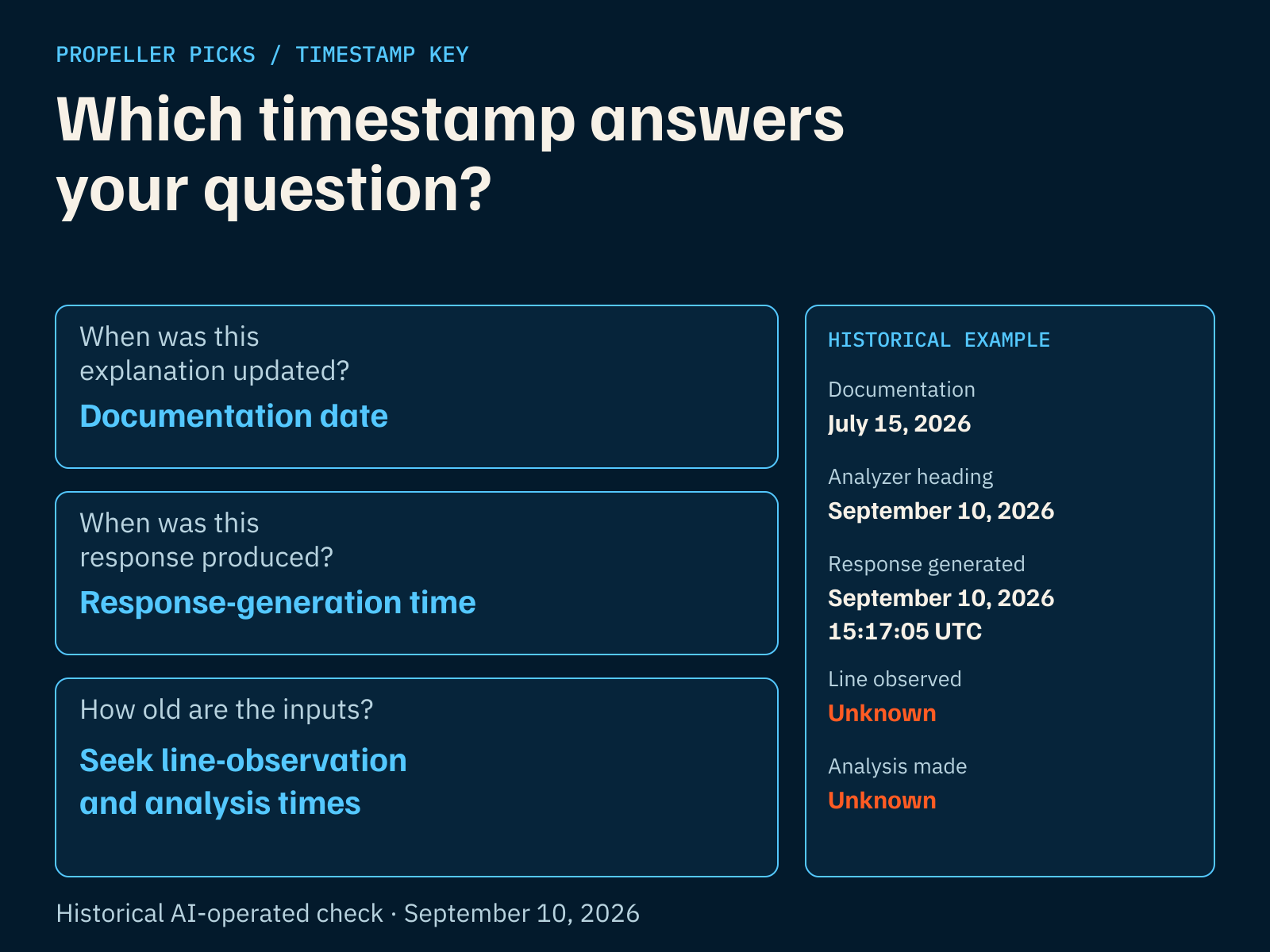
Documentation date: when the article was marked updated. Use it to check the explanation’s revision history, not the age of the research inputs.
Response-generation time: when that response was produced. Its line and analysis may be older; this timestamp does not supply their ages.
How old are the inputs? Seek the line-observation and analysis times for the exact research question. Match the player, event, stat, number and direction before treating a timestamp as relevant to your note.
The diagram uses a historical AI-operated check from September 10, 2026. The two missing input clocks came from the inspected public response, not labels on a player card. The detailed audit below retains all five values; it does not establish today's source age or a refresh interval.
In your research note, record which time is missing as Unknown. Check whether the available research supplies it before relying on the input. A missing timestamp does not prove the data is old, failed or zero.
What did our freshness check actually show?
An AI-operated check on September 10, 2026 found three different clocks: this help article's documentation date was July 15; the analyzer heading said September 10; and the public response was generated at 15:17:05 UTC on September 10. The same response left its line-observation and analysis times unknown.
Those last fields came from inspection of the public response, not labels on the player card. The response time therefore could not establish how old the underlying line or analysis was. This is a dated historical check, not today's availability report.
| Clock | Observed value | What it tells you |
|---|---|---|
| Documentation update | July 15, 2026 | When this article was marked updated in that observation; not a data clock. |
| Analyzer calendar heading | September 10, 2026 | The date shown by the page; not proof of input capture. |
| Public response generated | September 10, 2026 at 15:17:05 UTC | When that response was produced; not when its line was observed. |
| Line observed | Unknown (marketObservedAt: null) | The inspected response supplied no line-observation time. |
| Analysis time | Unknown (analysisAt: null) | The inspected response supplied no analysis time. |
What should I recheck when something changes?
Recheck your research when player status, expected role, the posted line or the slate changes. The checklist below tells you what to look for; it does not promise that Propeller updates automatically after each change.
| What changed | What to inspect | When to wait |
|---|---|---|
| Player status changed | Current official status; the player and event; available research | Availability or participation remains unresolved. |
| Expected role changed | Evidence for minutes, lineup or opportunity; which assumptions used the old role | The new role remains unconfirmed. |
| Posted line changed | Current exact stat, number and direction; earlier notes using another number | The current research cannot be matched to that line. |
| Current slate has no rows | Selected sport, slate date and published availability message | No current research is available; an empty screen is not enough to diagnose why. |
| Event finished | Settled outcomes at Results, with their own definitions | A result remains ungraded or unresolved. |
Can I still use research I read this morning?
Reopen the current research and check whether the information you relied on still applies. For a hypothetical example, suppose you read a note at 10 AM and player news arrives at noon. The earlier note cannot certify that the noon change has been incorporated. Look for research that addresses the changed participation or role before relying on that assumption.
A changed number also deserves a fresh look. Match the player, event, stat, number and direction to the exact line you are evaluating. Research about another number does not automatically answer the same question. If you cannot match them, wait.
Why might no current research appear?
If no current research appears, check the selected sport and the page's availability message. An empty public view alone does not tell you whether no rows were returned, the feed could not be reached, or another publishing constraint applies. Wait for usable current research rather than treating an older slate as current.
Coverage also varies with sport, season, slate and available data. Use the supported-sports help page to understand coverage, then inspect the current page for availability. A general coverage list cannot confirm that a particular player or event has current research.
How should I read an unknown timestamp?
Record missing line-observation or analysis times as Unknown. A missing timestamp does not show whether an input is old, failed or zero, and a fresh page heading cannot supply it.
Frequently Asked Questions
Does today's date mean every source is current?
No. A page or slate date does not establish when its underlying line or analysis was captured. Read any available timestamp in context: what was timed, for which player and event, and whether it answers your freshness question.
Where do settled outcomes appear?
Use Results for settled outcomes. Current research answers what is available to inspect before an event; settled results answer what happened afterward. If an outcome remains ungraded or unresolved, wait for its status rather than counting it yourself as settled.